
FacetworX
The ultralight Enterprise Design workbench for EDGY
Model an organisation in the EDGY language, check it as you go, draw clear diagrams, and ask an Enterprise Twin what happens when things change. Everything runs on your own computer: no account, no cloud, no data leaving the room.
New to Enterprise Design?
Every organisation is a mix of things that are usually looked after by different people: why it exists and what it stands for, how its work gets done, and what it is like to deal with. Strategy sits with leadership, processes and systems with operations and IT, customer experience with marketing and service teams. Each discipline has its own diagrams and its own words, so the connections between them are easy to miss.
Enterprise Design is the practice of looking at all of it together, so that changes in one place are made with the rest in mind. It gives a team one shared picture to plan, decide and improve from.
What is EDGY?
EDGY is an open, visual language for Enterprise Design, created by Intersection Group. It is deliberately small, so people from any discipline can read it, and it describes an enterprise through three facets:
Identity
Why we exist and who we are: Purpose, Story and Content.
Architecture
How we work and what we can do: Capability, Process and Asset (systems, data, facilities).
Experience
The role we play in people’s lives: Task, Journey and Channel.
Where the facets meet are Organisation (Identity and Architecture), Product (Architecture and Experience) and Brand (Identity and Experience), and People take part across all of it. Elements are connected by a small set of relationships, such as a Process requires an Asset or a Product serves a Task, so a model reads almost like plain sentences.
You can learn the language at enterprise.design. FacetworX applies the rules for you, so you can start modelling before you know them all.
What FacetworX does
- Builds the model with you. Add elements one by one or paste a list straight from Excel. Common words are mapped to EDGY for you: a system becomes an Asset, a team an Organisation.
- Checks it against EDGY as you go. Relationships the language defines get their standard label; anything else is kept as an implicit link and flagged for review, never thrown away.
- Draws diagrams from one model. Any number of views, each in the official EDGY shapes and colours, with tags and relationship labels.
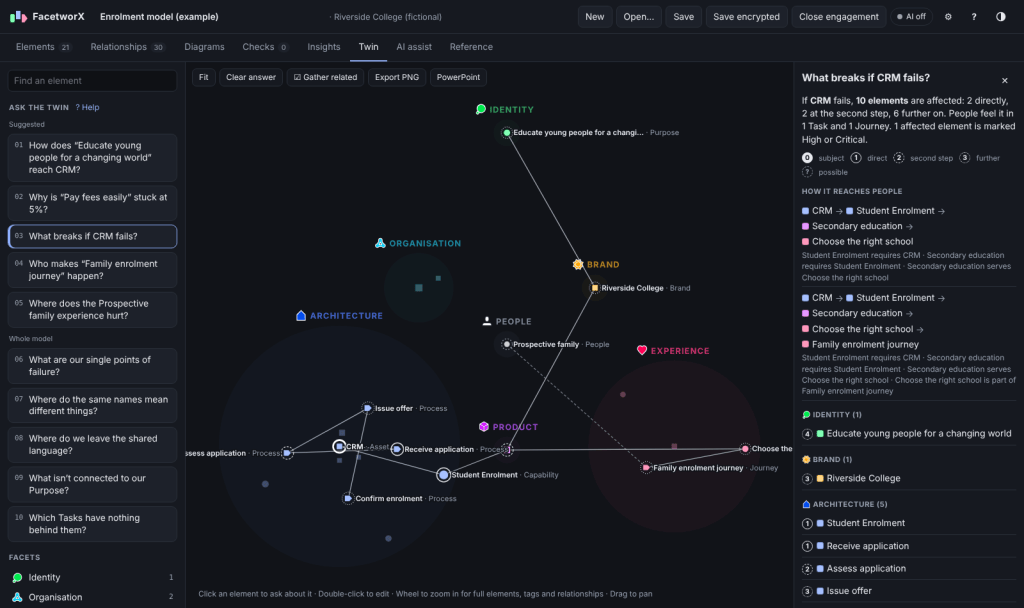
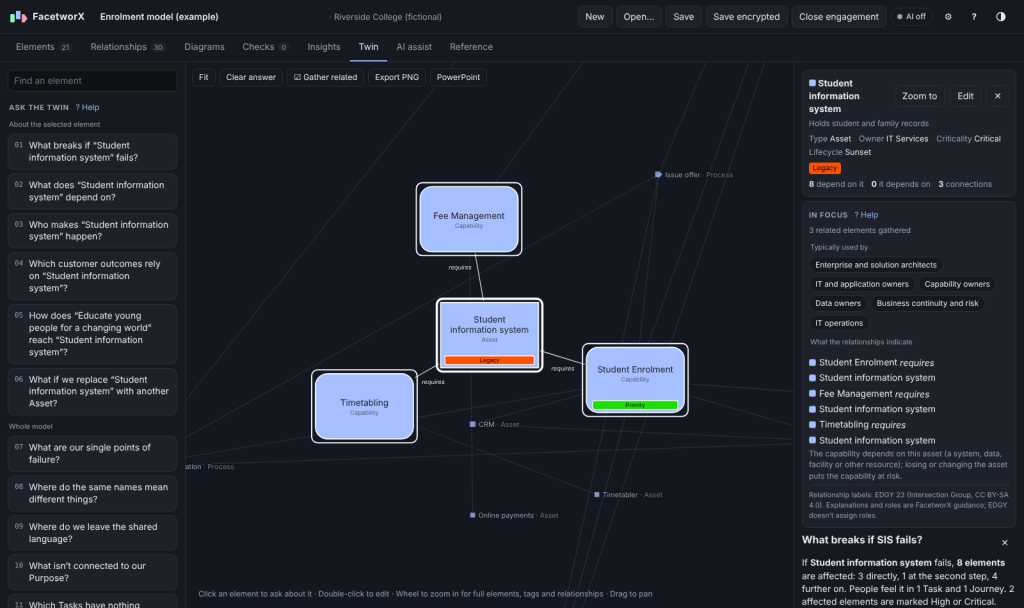
- Answers what-if questions. The Enterprise Twin lays the whole enterprise out by facet and answers questions such as What breaks if this system fails?, Who makes this service happen?, Why is this measure stuck at 5%? or Where are our single points of failure? Click any element to bring its related elements together, see what each relationship means, and who typically uses that information.
- Tracks what matters. Record owners, criticality, lifecycle and reusable metrics with targets, then colour the Twin by health, risk or reach.
- Points to gaps and risks. Rule-based insights, such as capabilities with no supporting system or customer tasks nothing serves, each linked to the Enterprise Design Pattern that usually helps.
- Exports for your audience. Editable PowerPoint slides, draw.io files, PNG and SVG images, and spreadsheets.
Private by design
FacetworX was built for consultants who work across client sites with very different rules about data and AI.
- Runs entirely on your computer. No account, no cloud service, no telemetry, no automatic updates.
- Your files, your control. Engagements are saved as files you choose, optionally encrypted with AES-256.
- Portable. Run it from a USB stick and nothing is left on the host computer.
- AI is optional and off by default. Every feature works without it. Where a client allows it, you can connect a model running on your own machine to draft a model from workshop notes; it can’t reach the internet unless you deliberately allow it.
Download
Current version: 0.7.2 (21 October 2026). All three versions have the same features and open the same .edgy files.
| Version | Best for | Size | |
|---|---|---|---|
| Windows installer | Your own laptop. Installs for your account only, with no administrator rights needed. Adds a Start-menu shortcut and opens .edgy files on double-click. | 110 MB | Download |
| Windows portable | Client sites and shared computers. One file you can run from a USB stick; your work is stored beside it. | 104 MB | Download |
| Browser version | Trying it out, or computers where you can’t run programs. A single HTML file: save it and open it in Edge or Chrome. Nothing to install. | 0.8 MB | Download |
Requirements: Windows 10 or 11 (64-bit) for the installer and portable versions; a current Edge or Chrome for the browser version. The built-in example model, a fictional school, is the quickest way to see every feature.
A note on Windows security. The Windows versions are not yet code-signed, so Windows may show “Windows protected your PC” the first time. Choose More info, then Run anyway. On a managed work device, your IT team may need to approve it.
Check your download (SHA-256)
To confirm a file arrived complete and unaltered, run certutil -hashfile <file> SHA256 in a Windows command prompt and compare the result:
FacetworX-Setup-0.7.2.exe     f678ac4037fa7f603b873aabdaba43535fda75b73a20282977459b52da3868eb
FacetworX-Portable-0.7.2.exe  fc0dee0359751a68f3c3421f9a332bcf7de96f2f0104b8fae6d29df747c21162
facetworx.html                103f74f23f2713fff0bae9ece6adc79275489694a107f6a9a19fd671dcab10e0
Your first five minutes
- Open FacetworX and choose Explore an example, or start a new engagement.
- Add elements on the Elements tab, or paste a list from Excel.
- Connect them on the Relationships tab. FacetworX tells you how EDGY treats each pair.
- Draw a view on the Diagrams tab and choose Auto-arrange.
- Open the Twin tab and ask it a question.
A full guide is built into the app: press F1 on any screen.
Changelog
0.7.2 · 21 October 2026
- Zoomed-in Twin: elements outside the current focus stay as small dots labelled with their name and type, so the focused group reads like a diagram while you can still see what surrounds it.
0.7.0 · 21 October 2026
- Metric library. Define a metric once (name, unit, whether lower is better, a default target) and assign it to any number of elements, each with its own value and target. Rename it once and every element updates.
- Assign a metric to many elements at once, for example every Asset, and filter the element list by metric.
- Excel imports match metrics to the library by name, and older files build their library automatically.
- Fixed: in a gathered Twin group, labels from neighbouring relationships could sit beside the focused element and be misread as its own.
0.6 · 20 October 2026
- New: the Enterprise Twin. A map of the whole enterprise by EDGY facet, with Objects at the centre of each facet, Activities around them and Outcomes on the outer ring. Ask it what breaks if something fails, what something depends on, who makes it happen, where the experience hurts, and more. Every answer comes from the model’s relationships, with no AI involved.
- Properties on elements: owner, criticality, lifecycle and whether an alternative exists, plus measured values with targets.
- Lenses that colour the Twin by impact reach, health, criticality or lifecycle.
- Smooth zooming from an overview of dots to full EDGY elements with their names, types, tags and relationship labels.
- Click an element to gather its related elements around it, with a panel explaining what each relationship indicates and which roles typically use it.
- EDGY facet icons throughout the app and guide.
- Export the Twin, and its answers, to PNG and PowerPoint.
0.5 · October 2026
- Relationship labels now follow EDGY convention: beneath the line, next to the element that starts the relationship.
- Relationships EDGY doesn’t define are kept as implicit links, rather than refused.
- Save updates the same file, with optional auto-save.
- A full built-in guide (press F1), also printable as a PDF.
- Coloured tags shown as bars on each element, with search by tag.
- New name and look: FacetworX.
0.4 and earlier · October 2026
- First releases, as Off Grid EDGY: modelling, EDGY checks, diagrams, insights, PowerPoint and draw.io export, encrypted files, optional local AI, and the Windows installer and portable versions.
Feedback and support
Questions, ideas or something not working? Get in touch. If you’d like help applying Enterprise Design and EDGY in your own organisation, that’s what 10K1W does.
EDGY is created by Intersection Group and published at enterprise.design under the CC BY-SA 4.0 licence. FacetworX is an independent tool by 10K1W and is not affiliated with or endorsed by Intersection Group.
