

The tool aims to move away from the semantics and theory of learning Enterprise Design using EDGY elements, to a simple demonstration of a tangible real-life mechanism with variable attributes represented using EDGY elements.
- Learn EDGY elements, relationships and meaning through expression via a Digital Twin
- Understand the impacts of core principles of the Architecture (i.e., the Asset, Capability and Process)
- The Products produced by the Architecture (in this case the weather data)
- How the Products impact Tasks completed by People.
- The LLM determines a Task based on the weather Product and time of day that would be appropriate for a person to be engaging in.
- For individual instruments (like the Anemometer, it also looks up the current wind speed and expresses it within the Task name and / or Note using the Beaufort Scale specification.
The tool architecture is as follows:
- The parameters entered via the UI are processed via the AI Workflow agent
- The agent calls and external API that returns the current weather observations for the Weather station
- The weather observations, instructions based on weather conditions and the time of day, structure and syntax and example models to construct, are processed by the LLM and output as the Digital Twin model in PlantUML code
Interacting with the UI
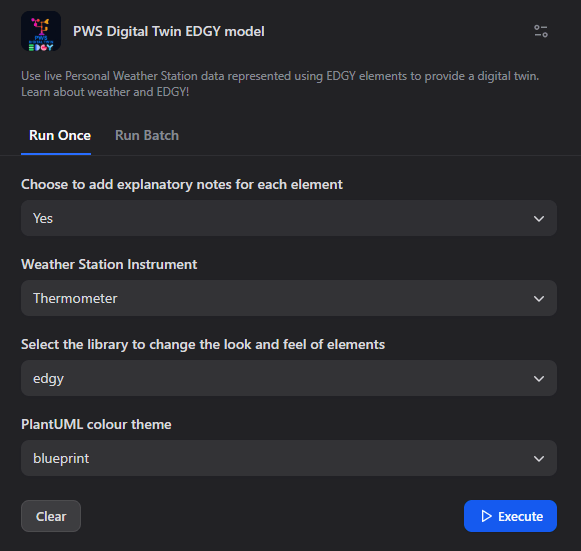
- The user can choose to add a note to each element to explain it’s use (a feature of PlantUML).
- Select the Weather Station Instrument:
- Anemometer will define an Asset, Capability and Process which creates wind speed, wind gust and wind direction Products (and Beaufort scale specifications of current wind speeds)
- Thermometer will define an Asset, Capability and Process which creates temperature, heat index and humidity products)
- Current conditions will define the Assets, Capabilities and a Process which creates each of the Products to present the current conditions.
- Summary of current conditions will define the Assets, Capabilities and a Process which creates a single Product which is the summary of the current conditions.
- Select the library to change the look and feel of elements to change the output (edgy specification or edgy2 for colour blinded people)
- PlantUML colour theme to change the background colour and other attributes
LLM Processing
The LLM instructions use the input variables above and gather the current weather conditions from the PWS station via API. Based on EDGY PlantUML specification (which is available as knowledge) a model is created based on these elements. The LLM does some conversion (Fahrenheit to Celsius, lookup the Beaufort scale for the current wind speed) creates an appropriate Task that can be performed based on the Product(s). An appropriate Person is created and performs that Task.
Output
Using the above parameters, the result is a code block of PlantUML code using the EDGY library specification:
@startuml
‘ Use the blueprint theme and include edgy library
!theme blueprint
!include
‘ Define Asset elements
$asset(“Thermometer”, thermometer)
$asset(“Anemometer”, anemometer)
$asset(“Barometer”, barometer)
‘ Define Capability elements
$capability(“Measure Temperature”, temp_cap)
$capability(“Measure Wind”, wind_cap)
$capability(“Measure Barometric Pressure”, pressure_cap)
‘ Relate Capabilities to required Assets
$link(temp_cap, thermometer, “requires”)
$link(wind_cap, anemometer, “requires”)
$link(pressure_cap, barometer, “requires”)
‘ Define the Process for measuring current conditions
$process(“Measure Current Conditions”, measure_conditions)
‘ Relate Process to Capabilities
$link(measure_conditions, temp_cap, “realises”)
$link(measure_conditions, wind_cap, “realises”)
$link(measure_conditions, pressure_cap, “realises”)
‘ Define Product: current weather conditions
‘ 52°F = 11.1°C (temperature)
‘ 70 (humidity, assumed unchanged)
‘ wind speed measured by 0 (assume 0 mph) = 0 km/h
‘ barometric pressure 30.04 inHg = 1017.0 hPa
‘ Let’s call the product: “Cool, Calm, and Clear Morning”
$product(“Cool, Calm, and Clear Morning”, current_conditions)
‘ Relate Process to Product
$link(measure_conditions, current_conditions, “creates”)
‘ Define Task: “Go for a morning walk” (comfortable, cool, calm conditions at 10:36am)
$task(“Go for a Morning Walk”, morning_walk_task)
$link(morning_walk_task, current_conditions, “served by”)
‘ Define People: “Walker”
$people(“Walker”, walker)
$link(walker, morning_walk_task, “performs”)
@enduml
Viewing the Model
The output can be copied (using the clipboard image) and pasted into various tools, such as Visual Studio Code, or the PlantUML online Webserver to view the EDGY model.

Try it out
Use the following link to access the PWS Digital Twin EDGY Model
Use Cases
Explicit
- STEM (Science Technology Engineering and Maths) in Schools – learn weather, and simple coding and become familiar with EDGY as as simple visual language to represent the tool.
Implicit
- Further investigation using EDGY as a digital twin. The basic structure of feeding data from an API to use AI to build an EDGY model with fixed Capabilities, Assets and Processes but with dynamic Products (values) and Tasks could be used in various scenarios involving targeting customers and products, etc.

Leave a comment